Showing posts with label Applications. Show all posts

Monday, May 20, 2013

Torch: Download your torrent files within the browser

Torch: a Chromium based browser
From the ocean of piracy, we draw so many files everyday for various purposes. But after selecting the torrent file it is not easy as downloading a meta-link through any download manager. Hence it requires a torrent client to be satisfied. Every time you use public computers it is not allowed to install clients over there.
This post will surely make you happy after finishing it up.
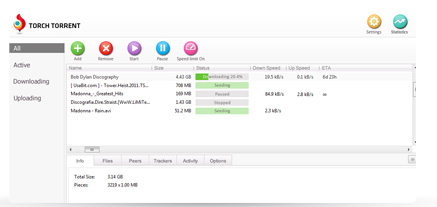
There is chromium based browser named as Torch. Available free as it is  a open source project. Torch  itself is a custom made unique flavored browser which enables torrent client within its body (Go to the screenshot). Features available in Torch
  • Power user of torrent client
  • Captures online streaming (Music & Video files)
  • Receives both magnet link as well as .torrent files
  • The downloading interface is quite friendly
  • Advanced tweaks can be manipulated as changing the priority level of files, no. of connection
  • The speed is as good as u torrent
  • Supports all the chrome extensions
All purpose browser which can be used both as torrent client & an advanced browser. Supports all the features which are been supported by Google Chrome. But one need to start up the browser which is not an issue for general torrent client.

Get your torch browser here. You can download it from an offline installer also here

Wednesday, April 3, 2013

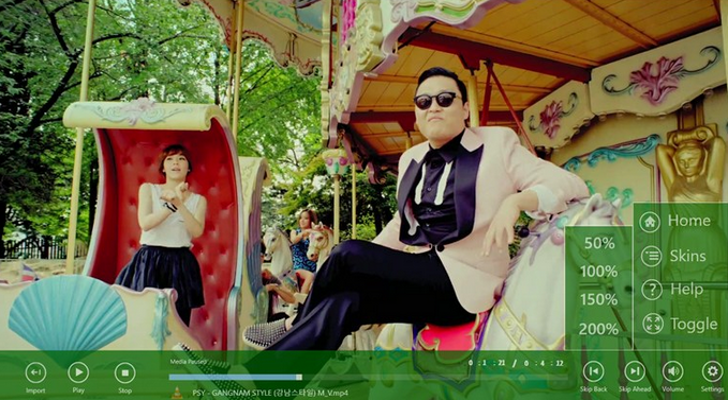
VLC for windows 8 soon to be in action

VLC for Win8
Today the team bringing VLC Player to Windows 8 – via the Windows Store so that it will run on Windows RT devices - updated their financial backers as to their progress. When the VLC group set out to Kickstarter to raise 40,000 quid to build the ‘Metro’ version of their video playing software, it attracted the sum with nearly a week to spare, with over 3,000 folks chipping in to fund the project. The stated goal was simple: take its “existing code, which already works on Windows 8′s ‘desktop mode’, and make it run on WinRT, the ‘Metro’ interface.”
Surface view

There's both good news and bad. They've managed to cut down 90% of what's "forbidden" in the modern user interface, working closely with Mingw-w64 project and GCC developers. They managed to achieve this by:

  • replacing our forbidden calls with newer authorized equivalent calls,
  • modifying gcc and Mingw-w64,
  • writing new code in a special library of ours,
  • writing dummy functions,
  • disabling VLC code that would not work on the Metro platform,
  • moving VLC to MSVCRT 11.0, moving all the VLC codebase to UNICODE and WideChars to fit the new requirements.
  • We did also a lot of minor things to help the integration of libVLC and VLC in this modern platform


It's so close we can almost taste it. The team reports that they're working on the following objectives:
  • make VLC work with MSVCRT 11.0 without crashing
  • write headers and C/C++ code to access the new fashion of COM APIs in which WinRT is written in

Saturday, March 9, 2013

NTM: Useful tool for limited pay-plan of Internet users


Network Traffic Monitor
NTM (Network Traffic Monitor) is a monitor of the network and internet traffic for Linux.
Features: 
  • Choice of the interface to monitoring.
  • Period to monitoring: Day, Week, Month, Year or Custom Days. With autoupdate.
  • Threshold: Autodisconnection if a limit is reached (by NetworkManager).
  • Traffic Monitoring: Inbound, outbount and total traffic; Show the traffic speed.
  • Time Monitoring: Total time of connections in the period.
  • Time Slot Monitoring: Number of sessions used.
  • Reports: Show of average values and daily traffic of a configurable period.
  • Online checking with NetworkManager or by "Ping Mode".
  • The traffic is attributed to the day when the session began.
  • Not need root privilege.
  • Not invasive, use a system try icon.
NTM is useful for the people that have a internet plan with a limit, and moreover the exceed traffic is expensive.

Mobile Media Converter


Mobile Media Converter
The Mobile Media Converter is a free audio and video converter for converting between popular desktop audio and video formats like MP3, Windows Media Audio (wma), Ogg Vorbis Audio (ogg), Wave Audio (wav), MPEG video, AVI, Windows Media Video (wmv), Flash Video (flv), QuickTime Video (mov) and commonly used mobile devices/phones formats like AMR audio (amr) and 3GP video. iPod/iPhone and PSP compatible MP4 video are supported. Moreover, you can remove and add new formats or devices through the internet.

An integrated YouTube downloader is available for direct downloading and converting to any of these formats. Popular sites such as Dailymotion, Photobucket videos, blip.tv, Soundcloud and Youku are supported too. You can trim your clips for ringtone creation or any other purpose and crop your videos for removing up/down black bars or other unwanted parts of the image. Additionally, embedded subtitles can be encoded onto the video for watching movies or shows with subtitles on devices that does not supports them. Finally, a built-in DVD ripper is available to transform your own DVDs to any of the supported formats.

The program has a very easy-to-use and simple GUI (Graphical User Interface) that helps even the most amateur user. Most of the times, the only data that you must enter is the input file(s) or just drag 'n' drop the input file(s)! The 3GP and AMR formats are used by mobile phones for MMS, video and sound recordings, etc.

Monday, February 18, 2013

Rhythmcat: Ultra-light music player for LINUX

Rhytmcat
The default music payer of all the Linux platforms are little bit memory exhaustive applications  but here we have discovered one of the ultra light music payer viz.  Rhythmcat which will run only on 7.4 MB at max. while Banshee & Rhythmbox take more than 35 MB. 

It can be used as a normal music player, and it can also show lyrics in a single window, or even on the desktop. It can help you mix your voice into the original music. And this player can help you convert the format of your music files, or cut/join your music. 

Get Rhythmcat here. (The donload size is less than 1MB, get started now). In the main page just go through the left pane & checkout the download options.

Saturday, February 16, 2013

Fedora Utils: Tweaks Fedora head to bottom


Thursday, February 14, 2013

Package Converter (GUI) - Ubuntu/Linux Mint

Package Converter
We use different platforms of Linux but the objective is almost same to conclude. Hence the various distribution packages i.e. DEB, RPM, PKG, TGZ and more make problem to us finding them. But here we find out a a frontend GUI For alien to convert between various distribution packages named PACKAGE CONVERTER. The application is written in Realbasic and Python and it supports all alien parameter options.

Installation procedure for Ubuntu 13.04/12.10/12.04/11.10 & Linux Mint 14/13/12 :

sudo add-apt-repository ppa:upubuntu-com/ppa 
sudo apt-get update 
sudo apt-get install package-converter

Monday, January 21, 2013

Sunflower: Improved way of data transfer - Ubuntu

Sunflower: File Manager

The usual cast of difference between Windows & Linux users is that the file manager of Window is always superior than any of the Linux based managers. Hence the data transfer is a major problem in Linux as it carries much time as compared Explorer of Window. But here we found an alternative to keep our good work in line.

Sunflower is a highly customizable Linux file manager that supports dual panes and plug-ins. It can be integrated easily in Gnome-based desktops. This amazing file manager has been updated to version 0.1a-51 which brings these new changes:

  • Performance improvements for the copy function (the file manager will now check available space before starting the copy operation)
  • Fixed a bug that causes entries to be duplicated in the mount manager
  • Various bugfixes
To install Sunflower in Ubuntu 12.10/12.04 and Linux Mint 14/13 or older, open the terminal & run :

  • sudo add-apt-repository ppa:atareao/sunflower 
  • sudo apt-get update 
  • sudo apt-get install  sunflower

Sunday, January 20, 2013

PDFsam: Merge and Split pdf documents on Linux

PDFsam
PDF Split and Merge is a complete opensource application and easy to use tool to merge and split pdf documents. Console and GUI versions are available. The GUI is written in Java Swing and it provides functions to select files and set options. It's made over the iText library. This application has been developed by Andrea Vacondio.


One of the common file extension on the computer is Portable Document Format (PDF). It runs on multi-platform operating system and application. As the document extension, PDF can include texts, pictures, and some additional information in one format document. PDF help people with different operating system to share or exchange the files without any challenges of compatibility. Using PDF people don't need to convert document files into other extension to be opened on different word processor.  


Merging, extracting and spliting PDF document is another common users need. However, people sometime need to split a PDF document into another one. in other case, people need to extract some pages into a different file. on the MIcrosoft Windows, Adobe Professional is the most used application to run this function. How about the similiar application on the Linux?

Here is your solution PDFsam.

Methods of installation: (Any of the below option is yours)
  • Simply put the command on your terminal sudo apt-get install pdfsam
  • Search through 'Synaptic' and go for general installation process.
  • Here is your .deb file, after download run this command on the corresponding directory sudo dpkg -i pdfsam_2.2.1.deb
  • You can go more ease with launchpad.

Thursday, October 25, 2012

Best PDF reader you have ever had : Nitro PDF Professional


Many a times it is been easier to get access through all the PDF files with Adobe reader but it can suffice all the required post-manipulation handling and we again search for other applications to convert edit through our PDF files. After all here we got the Full version of Nitro PDf Reader Professional (with Keygen).


Complete Description
Nitro PDF Professional, the complete Adobe® Acrobat® alternative, enables you to do more with PDF through powerful tools to create, convert, edit, combine, secure, annotate, form-fill, and save 100% industry-standard PDF files. Recipient of multiple best product awards, Nitro Pro is specifically designed for the business user and makes working with PDF faster and easier than ever before!

Create PDF
Create PDF and PDF/A files from virtually any Windows application, with full control over PDF output options. Offering one-click conversion for many commonly-used file types (including Microsoft Word, Excel, PowerPoint, WordPerfect, and more), Nitro PDF Professional simplifies the PDF creation process. All PDF files created with Nitro PDF Professional are 100% compatible with other PDF viewing applications including Adobe Reader and Adobe Acrobat.

Edit PDF
Edit PDF content, no matter what it is. From correcting minor typos and updating or removing text, to advanced image editing tasks such as inserting, replacing, cropping, resizing and downsampling, Nitro PDF Professional makes it easy to make last-minute edits. Create consistency throughout your documents by inserting headers, footers, watermarks, page numbering and more. Edit document properties and optimize PDF for distribution, creating polished, recipient-ready PDF files.

Convert PDF
Easily convert PDF to Word and PDF to RTF with industry-leading accuracy, enabling quick content reuse in Microsoft Word, WordPerfect, OpenOffice and more. Extract text and images from PDF files in a single click, for trouble-free repurposing in other programs. Copy entire blocks of text or take snapshots of PDF pages for quick pasting into another document.

Review & annotate PDF
Streamline processes and eliminate paper waste through electronic document review. Use Nitro PDF Professional's intuitive commenting tools to add notes, text feedback, drawing markups and more. Reply to feedback from others, or view, consolidate, organize and summarize reviewer comments, all from a single location. Efficiently collaborate and share your comments with Adobe Acrobat and Adobe Reader users.

PDF forms
Create PDF forms quickly and easily using a robust set of form design and editing tools. In just a few clicks, turn static PDF documents into professional-looking PDF forms containing text fields, buttons, checkboxes, javascript and more. Fill in, submit, print and save PDF forms, all without breaking the bank.

Secure PDF
Control how people view and use your sensitive and confidential information through robust PDF encryption. Use passwords and digital certificates to restrict who can open files and perform other tasks such as printing, editing, copying and form filling. Use digital signatures and certification to ensure document integrity and prevent content tampering.

Assemble & combine PDF
Combine documents, spreadsheets, presentations and more into a single, polished PDF file. Nitro Pro's powerful editing tools enable you to reorder, delete, insert, extract, replace, split, and rotate pages, providing you precise control over your entire document while guaranteeing your information is presented exactly as intended.

Release description
A major new version release, Nitro PDF Professional 6.0 comprises several brand-new features, significant performance enhancements and feature extensions, and important bug fixes.

New features

  • Convert PDF for reuse in Microsoft Word, WordPerfect, OpenOffice, GoogleDocs and more. 
  • Create highly-editable files that retain page layouts, working tables, correctly justified paragraphs, drawing shapes, and more.
  • Create PDF files up to 50% faster
  • Summarize comments for paper-based viewing
  • PDF/A compliance support
  • Document management system (DMS) integration support
  • Grid and Snap-to-Grid tools
  • Full control over the PDF creation process
  • Major user interface improvements, including a new, easy-to-access Navigation pane, a Comments List panel for working with more detailed comments, and a dedicated Text Editing context ribbon for inserting and updating text.
  • Support for all 64-bit versions of Windows.
  • A replace text commenting tool.
  • Support for 'Show/hide field' action.
  • Full support of Unicode fonts (in all areas of the application) including Chinese, Japanese and Korean.
  • Integration with Lotus Notes.
  • Streamlined deployment for enterprise customers.

Home Page - Click Here

Sunday, August 12, 2012

Automatically changing wallpapers on Ubuntu


I was  meant to have a good collection of wallpaper from my friend Satya & tried to put them all scrolling in my Ubuntu desktop, searching for a while for this kind of program which could automate the changing of wallpapers on a Ubuntu Machine. I finally did find the program tonight. It’s called wallch. Open the terminal and type or search it in synaptics.

$sudo apt-get install wallch
Now when the program the installed run it and add your images folder or certain random images you would like to cycle through on desktop. It’s pretty feature rich.
Pro’s Include :
    + Changing wallpaper choosing images randomly
    + Change wallpaper in random time (2-20min)
    + Live earth wallpaper which works according to your Time Format
    + Automatic settings for startup

Tuesday, August 7, 2012

Access any archive file with one command - Ubuntu

Usually to unzip any kind of zipped file we use many kinds of application as well as commands. Hence when extracting archive files using the terminal, there will be archive formats having its own command syntax to extract it. Like, zipped files need to be extracted using the "unzip" command line tool, tar files need the "TAR" command, for 7z files, you need the "p7zip" package to be able to extract them, and so on.

Now no more  difficult to memorize Ubuntu commands, you can simply use a single command to help you extract the various archive formats from the terminal. This universal archive extracting tool is called ATOOL. To install it under Ubuntu 12.04 or older, run the following command:

sudo apt-get install atool

Using the cd command, go the the destination folder containing your archive file (7z, tar.gz, zip, etc.) and run the following command:
atool -x filename.ext

Example:
atool -x google-chrome-stable.tar.gz

If you prefer to extract the archive file in another folder path, use the following command:
atool -X /path/to/folder/ filename.ext

Example:
atool -X /usr/bin/  google-chrome-stable.tar.gz

For more parameters, run this command:
atool --help

Sunday, May 27, 2012

Encroach your VideoLAN more with some hotkeys !

VLC Media Player (Hotkeys)

CommandCodeHotkey
Fullscreenkey-toggle-fullscreenf
Leave fullscreenkey-leave-fullscreenEsc
Play/Pausekey-play-pauseSpace
Pause onlykey-pause[
Play onlykey-play]
Fasterkey-faster+
Slowerkey-slower-
Normal ratekey-rate-normal=
Faster (fine)key-rate-faster-fineUnset
Slower (fine)key-rate-slower-fineUnset
Nextkey-nextn
Previouskey-prevp
Stopkey-stops
Positionkey-positiont
Very short backwards jumpkey-jump-extrashortShift-Left
Very short forward jumpkey-jump+extrashortShift-Right
Short backwards jumpkey-jump-shortAlt-Left
Short forward jumpkey-jump+shortAlt-Right
Medium backwards jumpkey-jump-mediumCtrl-Left
Medium forward jumpkey-jump+mediumCtrl-Right
Long backwards jumpkey-jump-longAlt-Ctrl-Left
Long forward jumpkey-jump+longAlt-Ctrl-Right
Next framekey-frame-nexte
Activatekey-nav-activateEnter
Navigate upkey-nav-upUp
Navigate downkey-nav-downDown
Navigate leftkey-nav-leftLeft
Navigate rightkey-nav-rightRight
Go to the DVD menukey-disc-menuShift-m
Select previous DVD titlekey-title-prevShift-o
Select next DVD titlekey-title-nextShift-b
Select prev DVD chapterkey-chapter-prevShift-p
Select next DVD chapterkey-chapter-nextShift-n
Quitkey-quitCtrl-q
Volume upkey-vol-upCtrl-Up
Volume downkey-vol-downCtrl-Down
Mutekey-vol-mutem
Subtitle delay upkey-subdelay-uph
Subtitle delay downkey-subdelay-downg
Audio delay upkey-audiodelay-upk
Audio delay downkey-audiodelay-downj
Cycle audio trackkey-audio-trackb
Cycle through audio deviceskey-audiodevice-cycleShift-a
Cycle subtitle trackkey-subtitle-trackv
Cycle source aspect ratiokey-aspect-ratioa
Cycle video cropkey-cropc
Toggle autoscalingkey-toggle-autoscaleo
Increase scale factorkey-incr-scalefactorAlt-o
Decrease scale factorkey-decr-scalefactorAlt-Shift-o
Cycle deinterlace modeskey-deinterlaced
Show interfacekey-intf-showi
Hide interfacekey-intf-hideShift-i
Take video snapshotkey-snapshotShift-s
Go back in browsing historykey-history-backShift-g
Go forward in browsing historykey-history-forwardShift-h
Recordkey-recordShift-r
Dumpkey-dumpShift-d
Zoomkey-zoomz
Un-Zoomkey-unzoomShift-z
Toggle wallpaper modekey-wallpaperw
Display OSD menu on topkey-menu-onAlt-Shift-m
Do not display OSD menukey-menu-offAlt-Ctrl-m
Highlight widget on the rightkey-menu-rightAlt-Shift-Right
Highlight widget on the leftkey-menu-leftAlt-Shift-Left
Highlight widget on topkey-menu-upAlt-Shift-Up
Highlight widget belowkey-menu-downAlt-Shift-Down
Select current widgetkey-menu-selectAlt-Shift-Enter
Crop one pixel from the topkey-crop-topAlt-r
Uncrop one pixel from the topkey-uncrop-topAlt-Shift-r
Crop one pixel from the leftkey-crop-leftAlt-d
Uncrop one pixel from the leftkey-uncrop-leftAlt-Shift-d
Crop one pixel from the bottomkey-crop-bottomAlt-c
Uncrop one pixel from the bottomkey-uncrop-bottomAlt-Shift-c
Crop one pixel from the rightkey-crop-rightAlt-f
Uncrop one pixel from the rightkey-uncrop-rightAlt-Shift-f
Randomkey-randomr
Normal/Repeat/Loopkey-loopl
1:4 Quarterkey-zoom-quarterCtrl-1
1:2 Halfkey-zoom-halfCtrl-2
1:1 Originalkey-zoom-originalCtrl-3
2:1 Doublekey-zoom-doubleCtrl-4
Very short jump length (integer)extrashort-jump-size3


Tuesday, May 8, 2012

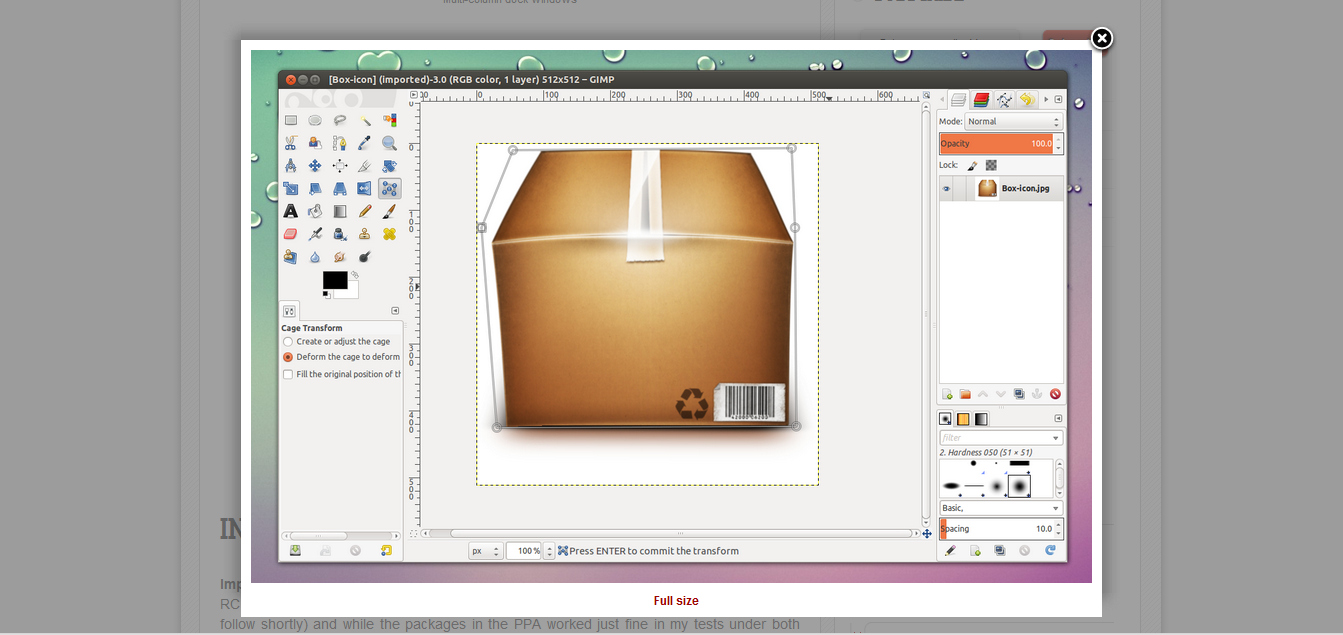
Finally GIMP 2.8 stable version is released

What are the different & new features available in the newer version of GIMP (2.8) 

GIMP 2.8 stable released
  • Single window mode: Single main window instead of overlapping floating windows (also optional for the users those are acquainted with the previous versions. 
  • On-Canvas Text editing : Editing text is not performed in a separate window anymore.
  • Multi-Coloumn Dock windows which makes the GIMP UI a lot more customizable.
  • Improved screen real estate for dock able dialogs using "save" now saves the file in the GIMP XCF format and it can't be used for saving PNG and other files. for non-xcf file types, we have to use the 'export' menu entry.
  •   It's easy to create layer groups which can be organised in tree-like structures brush system and tool preset improvements. 
  • Now easy to tag brushes and patterns, new slider widgets. 
  • A new set of default brushes and tool presets from RAMON MIRANDA
  • New open window navigation which displays a small preview fro each tab 
  • Tools rendering on canvas have been ported to cairo to provide smooth antialiased graphics
  • A new 'lock pixels' feature 
  • Support for JPEG2000 and loading 16bit RAW data
  • Export color values to CSS, PHP, JAVA, PYTHON, or PLAIN TEXT.
  • Core integration of the graph -based GEGL library
  • Export to PDF
  • New Tool : Cage transform which maes it possible to easily warp parts of objects using an adjustable user-defined polygonal frame && more n more


Thursday, March 22, 2012

ZOHO Writer : Best & Easy Online Word Processor

Zoho Writer Online Word Processor
There is always need of a word processor everytime & everywhere. Documentation, designing, plotting, statistics, records etc. these are the things we always go through. But always we suffer the unavailability of a good word processor. Cyber cafe as well as offices are not provided with advanced Word Processors. If a older version is there we have to negotiate with the format problem. 
But now everything is so convenient as easy with Zoho Writer. It's a online Word Processor. It provides facilities that is beyond your usage. You can sign it with your Google account, Facebook account & also Yahoo id.
  • Sharing Collaboration
  • Import / Export Documents
  • Page View Editing
  • Template Library
  • Offline Support
  • Post to Blog
  • Lots of Plugin Supports like Microsoft Office etc.
  • Tabbed Toolbar for easy management
  • Zoho Ofice for Microsoft SharePoint(new)
  Go to the screenshots gallery & check out every facility here.

Saturday, March 17, 2012

Double Driver: Easy backup for your system drivers

Double Driver
Often there is a need of system format as anything went wrong. Sometimes there is also no alternate option without having system format. But the only tedious job after installation of Operating System  is to find out the compatible drivers. Some of the companies like Dell, Acer etc. provides a Driver CD-ROM but others do not. We have to search it through Internet or by adjusting any other previous old drivers which is not performing well in your system. Sometimes we go for backup by copying all the data but it is not well adopted as we don't have the full knowledge about all of the drivers & we miss some of them. 
As per to the Windows user the problem is almost solved down here by Double Driver.
Installation process is described in screenshot...

Facebook Timeline is optional now

TimeLine Remove
People were excited to have the timeline look n feel in their Facebook account. But by time it is no more interesting & they want to get rid of it. But this is not happening in a normal way. Here a happy news for those want to get the older look back again to their accounts. 
Check TimeLineRemove. Available for all of the popular browsers. like Mozilla Firefox, Google Chrome/Chromium, Safari, Internet Explorer.(Safari is under improvement & will be released soon)

  • Just download the extension that you want in the preferred browser and drag the downloaded file to your browser, then allow it to work on your browser. 

Thursday, March 15, 2012

Windows get the most beautiful music player ever : Amarok

Amarok 
Music is the only soul that survives inside every heart. We use  many kinds of music players to play the rhythm & beat. Market avails a lot of music player but we go for the most reliable one. Choosing a player varies with the user depending upon mood & comfort. Some popular music players are available throughout various OS like i Tune in Mac, Banshee or Rhythm-box in Ubuntu/Fedora/Open Suse etc., media player in Windows. But the most beautiful one is featured with KDE that is none other than Amarok. The graphical interference is very eye-catchy while the features are amazing.
But the most awaited surprise to Amarok user is that it's now available for Windows, so friends again rediscover Your Music. The  features provided by Amarok, Take a look

Tuesday, March 13, 2012

CustoPack: Transform Windows to the best look you ever had.


CustoPack Tools
Windows Desktop environment that is given by default is a good surface to work on. But as repetitions go high it is not that much comfortable as it was earlier. So we search for a good theme as we do in our Handset. Often people go for looking into Internet for more themes compatible with Windows. Here we get some of the Windows themes but this is for enhancing the aero effects only which is not able to fulfill our aspects.  Some users need to transform their whole Desktop into a very new kind visualization. Unfortunately there is no other option to go for a superb desktop environment like any other OS as KDE, Gnome Shell, Unity, Mac Desktop, Android, Razor QT, etc. as we are highly satisfied with Windows because of its performance as well as user friendly support and always migration to other OS is not possible by all users.
Still there are many ways to resolve all the needs. A very easier and efficient way to get all of these is been solved by CustoPack. CustoPack is a customization tool that completely transforms the Windows Desktop environment to remarkable changes. Here starting from Visual effects to the Icon Pack everything is modified in a single application tool.
  • Download CustoPack  (installation file) & Install to your system with following common Installation Widgets.
  • Now download the required CustoPack Tools from its gallery.
  • After completion of downloading of the packages, install them with required options
  • Now reboot your system to take effects on your Desktop.
12

34
N.B.
  • Sometimes while installation it may be crashed so do not bother about it.
  • Close all the running applications and reinstall the programme.
  • At times when it has been crashed and also is not closing its window though pressing to the close button, Start the task manager and kill it from there & reinstall it.

56

                        78

ExpressFiles: Superior from any Torrent client


ExpressFiles
There is always a need of Download Manager or any other client that can make download our data from Internet easily. We use two Torrent clients or direct download managers. Difference is that Torrent client downloads the data from various sources & can be resumable at any time while other managers download the data faster by acceleration but not remain resumable for longer period. So bigger files like Movies, Discography, TV Series, Collections in compressed files, Operating System(.iso) file etc. are to be preferably downloaded through Torrent Clients. Torrent clients are more efficient in slower connection.
Besides all of these features available in any Torrent clients still there are many constraints are there and out of which one common problem to users is to find out a good, healthy torrent file; also there are many settings to be improved in the client to get a good speed of downloading which is not known to most of the users.
Here all of the issues are solved by a single torrent client ExpressFiles. The client is easy to install & easy to manage with no need of browser for searching torrent files. A single search will produce different files varying with its size, quality. The graphical interference is very nice & can be used not only in Windows also over a no. of Operating systems. (Here some of the screen-shots are to be followed)  
12
34