Wednesday, December 12, 2012

Connect internet in Linux through Nokia mobiles (No Nokia Suite is required)

Usually there is a notion that Linux environment is not so user friendly than that of Windows. But here are some sorts of example that Linux is always a better environment to work with. Often we have to install some programs in order to get connected with Internet whether it may be through a USB modem or any piece of mobile. As before the Samsung, Nokia was the leading runners of cellular world, here is our concern to get connected with an easier way. 

There is no need of any Nokia suite. In Linux you can connect internet with putting some lines in your terminal. But the first thing is to connect your PC with internet from any other source so that initially some small files can be downloaded. Here are the steps to be followed :

  • Open Terminal and type sudo apt-get install wvdial 
  • Now after putting your password and instaallation completion you go thruogh the following commands sudo gedit /etc/wvdial.conf
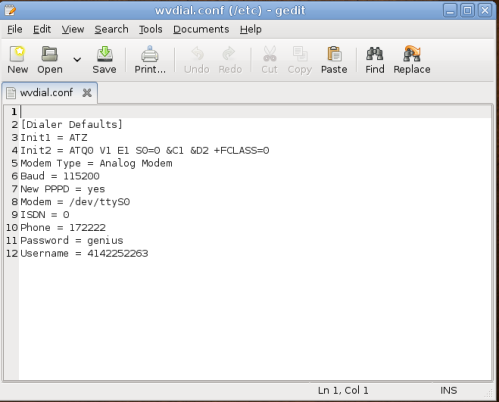
Now replace existing text with the following :
[Dialer Defaults]
Init1 = ATZ
Init2 = ATQ0 V1 E1 S0=0 &C1 &D2 +FCLASS=0
Modem Type = USB Modem
Baud = 460800
New PPPD = yes
Modem = /dev/ttyACM0
ISDN = 0
Phone = *99#
Password = A
Username = B
Stupid Mode = 1
  • Replace "A" & "B" from the above code your internet connection Password & Username. If there is no password necessary then leave the above code unchanged.
  • Save & close the editor.
  • Now plug in your data cable into your phone & run the following command from terminal each time you want to connect internet:  : sudo wvdial
  • Done! But if you fail to connect internet then do one of the following:
Unplug mobile cable, wait few seconds, plug again and run wvdial command
Or open /etc/wvdial.conf and replace Phone=*99# with Phone = *99***1#

Nemo : Better file manager than Nautilus 3.6

Nemo forked with Nautilus 3.4
The upcoming changes in Nautilus 3.6 created controversy among desktop Linux users. The latest version of the file manager application from GNOME project has been completely redesigned so that it is much simpler in term of visual design, and also in its functionality.

Though it is better looking and consistency with other GNOME apps, omitting of its features including compact view, tree view in sidebar, extra pane, and many other features available in its predecessor that are considered important features for many users, now needs a replacement to the nautilus. 

Ubuntu team has decided to stick with Nautilus 3.4 for its upcoming Ubuntu 12.10. Other Linux distro, Linux Mint team has had even more further move, by forking it, creating Nemo, a Nautilus 3.4 fork that keep its features, with some other useful addition. Nemo installation will also add some other features like Cinnamon Desktop etc.

Nemo has following new features :

  • All the features Nautilus 3.4 had and which are missing in Nautilus 3.6 (all desktop icons, compact view, etc..)
  • Open in terminal (this is part of Nemo itself)
  • Open as root (this is also part of Nemo)
  • File operations progress information (when you copy/move files you can see the percentage and info about the operation on the window title and so also in your window list)
  • Proper GTK bookmarks management
  • Full navigation options (back, forward, up, refresh)
  • Ability to toggle between the path entry and the path breadcrumb widgets
  • A lot more configuration options
Install Nemo in Ubuntu 12.04 (Go through your terminal)
sudo add-apt-repository ppa:gwendal-lebihan-dev/cinnamon-nightly
sudo apt-get update
sudo apt-get install nemo nemo-fileroller

Friday, December 7, 2012

Get classic theme back in your Windows 8

Windows classic theme
In some of the low end  machines people are used to be with the previous Windows classic theme which is not available in the latest edition of Windows. Here I like to recommend that using classic theme will enhance the performance always 18-25 % than by using the default or any kind of personalized theme. There is availability of other contrast theme in Windows 8 but not the regular classic theme. 

Hence we here get a solution for it. A deviantart user found us a theme for us which can be run under Windows 8. The best thing about having that is that you are not required to edit or replace original system files to get classic theme installed & also it can be used in both the 32 bit 64 bit versions. Here you just follow some of the steps : 
  • Download the classic theme
  • Extract the file anywhere and then copy it to the following path : C:/Windows/Resources/Ease of Access Themes folder
  • Do a right-click action on desktop, after that click Personalization to open Personalization window
  • To switch back use the Personalization window & select any other themes from there.         

Monday, November 12, 2012

Create your own Chrome theme in minutes


Usually we go for custom theme and search in Chrome Web Store but here is an extension available to create your Google themes in minutes. Pick your own background image & colors and have it as all yours. Follow some screen shots down here.

Go to the extension and launch it : 


Naruto : The Most Popular Anime Series(Watch n Download)


Naruto  is an ongoing Japanese manga series written and illustrated by Masashi Kishimoto. The plot tells the story of Naruto Uzumaki, an adolescent ninja who constantly searches for recognition and dreams to become the Hokage, the ninja in his village who is acknowledged as the leader and the strongest of all. The series is based on a one-shot comic by Kishimoto that was published in the August 1997 issue of Akamaru Jump.


Directed by Hayato Date and produced by Studio Pierrot and TV Tokyo, the Naruto anime adaptation premiered in Japan on TV Tokyo October 3, 2002, and ran for 220 episodes until its conclusion on February 8, 2007. The first 135 episodes are adapted from the first twenty-seven volumes of the manga, while the remaining eighty episodes are original episodes that utilize plot elements not seen in the original manga.Beginning on April 29, 2009, the original Naruto anime began a rerun on Wednesdays and Thursdays (until the fourth week September 2009 when it changed to just Wednesdays) inHDTV with new opening and ending themes under the name Shōnen Hen.

Watch N Download all Naruto & Naruto  Shippuden Episodes-