Tuesday, March 13, 2012

CustoPack: Transform Windows to the best look you ever had.


CustoPack Tools
Windows Desktop environment that is given by default is a good surface to work on. But as repetitions go high it is not that much comfortable as it was earlier. So we search for a good theme as we do in our Handset. Often people go for looking into Internet for more themes compatible with Windows. Here we get some of the Windows themes but this is for enhancing the aero effects only which is not able to fulfill our aspects.  Some users need to transform their whole Desktop into a very new kind visualization. Unfortunately there is no other option to go for a superb desktop environment like any other OS as KDE, Gnome Shell, Unity, Mac Desktop, Android, Razor QT, etc. as we are highly satisfied with Windows because of its performance as well as user friendly support and always migration to other OS is not possible by all users.
Still there are many ways to resolve all the needs. A very easier and efficient way to get all of these is been solved by CustoPack. CustoPack is a customization tool that completely transforms the Windows Desktop environment to remarkable changes. Here starting from Visual effects to the Icon Pack everything is modified in a single application tool.
  • Download CustoPack  (installation file) & Install to your system with following common Installation Widgets.
  • Now download the required CustoPack Tools from its gallery.
  • After completion of downloading of the packages, install them with required options
  • Now reboot your system to take effects on your Desktop.
12

34
N.B.
  • Sometimes while installation it may be crashed so do not bother about it.
  • Close all the running applications and reinstall the programme.
  • At times when it has been crashed and also is not closing its window though pressing to the close button, Start the task manager and kill it from there & reinstall it.

56

                        78

ExpressFiles: Superior from any Torrent client


ExpressFiles
There is always a need of Download Manager or any other client that can make download our data from Internet easily. We use two Torrent clients or direct download managers. Difference is that Torrent client downloads the data from various sources & can be resumable at any time while other managers download the data faster by acceleration but not remain resumable for longer period. So bigger files like Movies, Discography, TV Series, Collections in compressed files, Operating System(.iso) file etc. are to be preferably downloaded through Torrent Clients. Torrent clients are more efficient in slower connection.
Besides all of these features available in any Torrent clients still there are many constraints are there and out of which one common problem to users is to find out a good, healthy torrent file; also there are many settings to be improved in the client to get a good speed of downloading which is not known to most of the users.
Here all of the issues are solved by a single torrent client ExpressFiles. The client is easy to install & easy to manage with no need of browser for searching torrent files. A single search will produce different files varying with its size, quality. The graphical interference is very nice & can be used not only in Windows also over a no. of Operating systems. (Here some of the screen-shots are to be followed)  
12
34

Sunday, March 11, 2012

ext2explore: Helps Windows to access Linux Partitions

Windows &  Linux bridged by ext2explore 
Now-a-days people are no more satisfied with Windows  as their only OS performing in their system. Features & liveliness are more  in other OS like  Mac, Ubuntu, Open Suse, Fedora, Xfce, Google Chrome etc. More desktop environments are fetched which are more superior to Windows  like KDE, Gnome-shell, Razor Qt, Unity etc. Still Windows  is more user friendly  than any others and used most by the users.
Problem is to access files from Linux Partitions(ext2/ext3/ext4) from windows  desktop. While working in Linux/Unix/Mac the default target folders are attached with Home folder of Linux Partition. And we often forget to transfer them to our hard disk and it is been required at the time we are using Windows  .And the only way to access is to restart the system. As there is no in-built system to access Linux Partitions. But here a very light-weight programme is available known as ext2explore. The main feature is that it works without installation and very user friendly.
  • Download ext2exploreExtract it.
  • Now the application file named "ext2explore" has to run.(Make sure that you are running it as Administrator)
  • Otherwise it will create a file with a caution dialog box(see in screen-shots) & also it's not going to work as you wish.
  •  After running as "Administrator" Search your required files & folders. And Right click over it & choose save option from the context menu.
12
34
 The above screen-shots are taken from a customized Windows Desktop, so don't bother about it.

Canvas Rider : An addiction by Google chrome


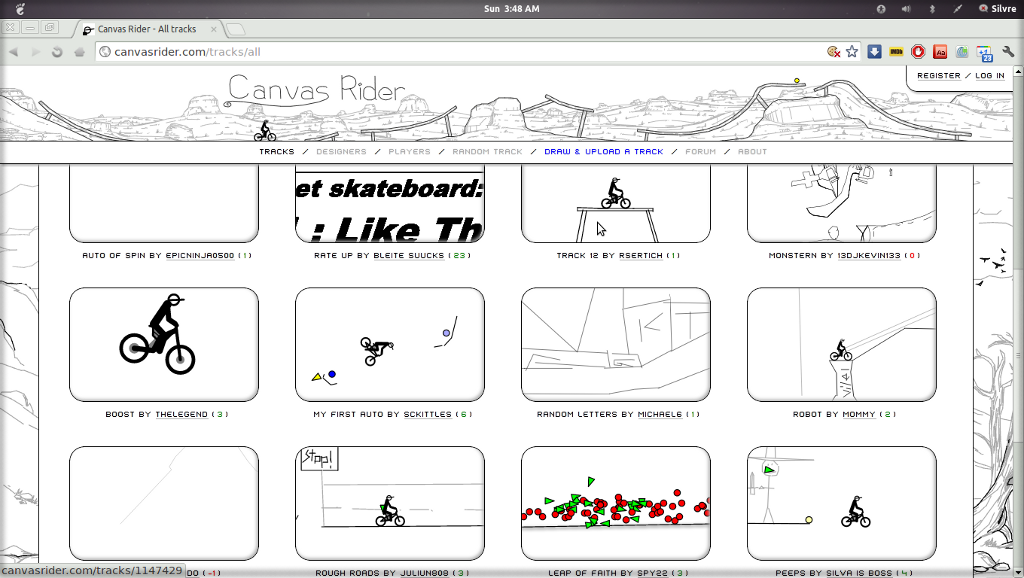
Canvas Rider Powered by Google Chrome

The beginning is an attachment and later it is an addiction, this is the way of gaming online.Often we play several online games may be its popular or not as it depends upon the diversity of interest. And the sources are buzzing around Internet, PC Games which includes online tracks, Friends' inclusion, Social Networks and even the Browser which is been used itself. The attachment with Social Network sites drag us to a pool full of addiction where we find some top games like FarmVilleMafiaWarsBow ManHasse BounceThe Last Stand  etc. There is also availabilty of games in the browsers itself like Google Chrome's Webstore provides a lot of games. 
And one of the Most recommended game is Canvas Rider.Though it is not a very popular game but it is quite appreciable as you ride a bike on tracks drawn by other players which is entirely written in java-script & HTML, using most of the new Canvas Element. Canvas Rider was created by Maxime & Pete with help from OneMoreLevel.com; it's partially based on Free Rider 2 which received many improvements. 
You can access it from Google Chrome Web Store  also search for the title and get it, here you can register to get more  facility. Controls are simple: press UP to pedal, DOWN to brake, LEFT & RIGHT to balance, Z to turn around. If you crash, you can always press ENTER to restart or BACKSPACE to cancel checkpoint(s). There are hundreds of new tracks submitted daily, so be sure to check the subcategories for the very best ones! 
If you are a designer or an  art-maker here you can exploit  yourself by designing tracks. 

Saturday, March 10, 2012

Fix Shockwave Flash Crashes in Google Chrome


As one of the most elegant browser Google Chrome provides an inbuilt Flash Player and that is none other than Adobe is distributing as a partner of Google. Also we use other browsers like Opera, Mozilla Firefox, UC Browser, Netscape etc. which are using Flash Player. But the problem is the crashes caused by the Flash Player.The reason behind being crashed by the Flash Player is due to confusion of utilization of  Flash Players means whether to use System Flash/OS Flash installed or the pre installed inbuilt Flash Player. And Google Chrome is suffering the most with the Shockwave crashes than any other browsers. The only way to get rid of it is to stop either one of them as it is not going to use both at the same time. So it's better to disable the inbuilt one.


The result is serious browser lag, temporary lockup, and then a browser-wide crash of all active Flash instances. You don’t realize how many web sites use Flash until every single tab locks up with a crash warning : "The following plug-in has crashed: Shockwave Flash”