Monday, May 20, 2013

Torch: Download your torrent files within the browser

,
Torch: a Chromium based browser
From the ocean of piracy, we draw so many files everyday for various purposes. But after selecting the torrent file it is not easy as downloading a meta-link through any download manager. Hence it requires a torrent client to be satisfied. Every time you use public computers it is not allowed to install clients over there.
This post will surely make you happy after finishing it up.
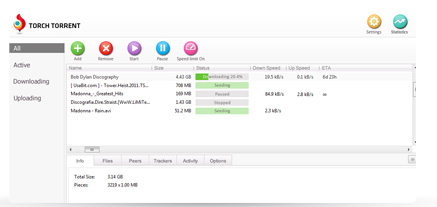
There is chromium based browser named as Torch. Available free as it is  a open source project. Torch  itself is a custom made unique flavored browser which enables torrent client within its body (Go to the screenshot). Features available in Torch
  • Power user of torrent client
  • Captures online streaming (Music & Video files)
  • Receives both magnet link as well as .torrent files
  • The downloading interface is quite friendly
  • Advanced tweaks can be manipulated as changing the priority level of files, no. of connection
  • The speed is as good as u torrent
  • Supports all the chrome extensions
All purpose browser which can be used both as torrent client & an advanced browser. Supports all the features which are been supported by Google Chrome. But one need to start up the browser which is not an issue for general torrent client.

Get your torch browser here. You can download it from an offline installer also here
Read more →

Tuesday, April 30, 2013

Get all the minute to minute update from piratebay.se

,

We all search for anything new everyday, or getting updated of anything usual before. Hence waste much more time having searching them & at last there few times remain for read out them & almost no time in hand to capture them.
 Here Feedly the very good alternative to Google Reader will help us out by feeding us every update from the most popular & most pirated torrent site known as piratebay.se; as this torrent site has been declared as serving the most piracy than any other torrent sites till 2012.
  • First get the feedly app in browser which most preferred by you as it is all available for the famous browsers
  • The only thing you have to do is type exactly "thepiratebay" in the search box of feedly app
  • And then subscribe it
  • Everytime you get on to the internet stream check the updates that which files have been recently uploaded

No way you will suffice your eye that much of updation ..have fun friends ...be busy..
Read more →

Monday, April 29, 2013

Remove guest session from UBUNTU

,
Remove guest session from login screen
Many times we prefer more personal with our ubuntu computers. Also there are required situation which needs to be disabled the guest session which has given by default. In windows we have to switch on the guest account or have to create it but it is been by default in ubuntu. Hence this simple read-out will help you to disable the guest session.

Open the terminal and paste the below line

sudo gedit /etc/lightdm/lightdm.conf


When the file will open make some edit there, add this particular  line at the end of the text file

allow-guest=false


Enjoy it all !!
Read more →

Cloud downloading of torrent files through put.io

,
cloud downloading of torrent files
This post will guide you for the downloading of torrent files through cloud. As the ocean of resources are torrent sites we often go visit for our files there, but it is not that easier to get downloaded those files as it depends upon various factors. And the most annoying is in public computers where our files are not cared. 
Let all the burdens being carried by these phenomenal site known as put.io ; previously there was another popular site  as torrific.com which has been shut down. And after lot a manipulating research I drained to a conclusion and here declaring put.io as the best among all.
Though there are still a lot of limitation are there; among them the 1GB limitation for 1 day is the greatest. But  it will stick to its performance always which is not guaranteed by others like boxopus, zbigz, bitlet.org, Quicktorrent. 
How to feed put.io

  • Login first then search for your file in a torrent site 
  • Most preferable sites are torrenthound.com, kat.ph, bitsnoop.com
  • Go to the add new files button
  • Copy the magnet link of the particular torrent and paste over it

That's all
If you are lucky you will get the files immediately & sometimes have to wait as the health of the torrent is not so good. 
The best thing is that you once feed put.io then leave it, automatically it will produce you a metalink which can be downloaded through any download manager. 
Also you can access unlimited plans by getting an premium account.
Read more →

Monday, April 15, 2013

torrentHound.com updates the all new advanced interface with Magnet link feature

,
torrentHound.com adds magnet link 
As we people are doing sins every-time connecting to the network as a part of piracy deeds. Any thing we go for searching it will be the torrents which gonna provide us as a must. Here I'm talking about the most popular torrent site torrentHound.com which is somehow lagging behind piratebay & kat in the contents. But the seed ratio is always high as we know but the very feature we were missing with the magnet link availability. 

But the issue is closed by today that it facilitates both magnet link & .torrent files at the same line along with the seed & leech count. 

People must know which one to prefer whether it is a magnet link or .torrent file. I will explain very shortly that if you require the file immediately as per your necessity & connection speed always prefer magnet link. But if the file size is too large that it will not be completed at once then choose the .torrent file as it keeps the tracker & data information quite good. Also you can transfer your files along with the .torrent file to resume it in another device which is not possible in magnet links. If the file size so large then every time you reconnect it will take longer time for the checking the older downloaded files in case of magnet links while it will take fewer secs in .torrent files support.

Choose wisely and enjoy piracy :)
Read more →